Amazon SKU Guide 2026: How to Create, Format & Manage Seller SKUs (with Free Generator)
Your Amazon SKU is the one piece of your listing you fully control, and most sellers get it wrong. A messy SKU system turns a 200-product catalog into a guessing game, breaks your reports, and slows down every shipment. This guide shows you exactly what an Amazon SKU is, how to build a clean naming format, how it differs from FNSKU, ASIN, and UPC, and how to generate hundreds of error-free codes in seconds with our free tool.
Table of Contents: Quick Navigation (Click to Expand)
- 1. What Is an Amazon SKU?
- 2. SKU vs FNSKU vs ASIN vs UPC
- 3. Amazon SKU Rules & Character Limits
- 4. How to Create an Amazon SKU (Step by Step)
- 5. SKU Format Examples & Naming Conventions
- 6. Parent-Child SKUs for Variations
- 7. SKU Mistakes That Cost Sellers Money
- 8. Generate SKUs Free with BuyBoxr
- 9. Frequently Asked Questions
1 What Is an Amazon SKU? (Plain-English Definition)
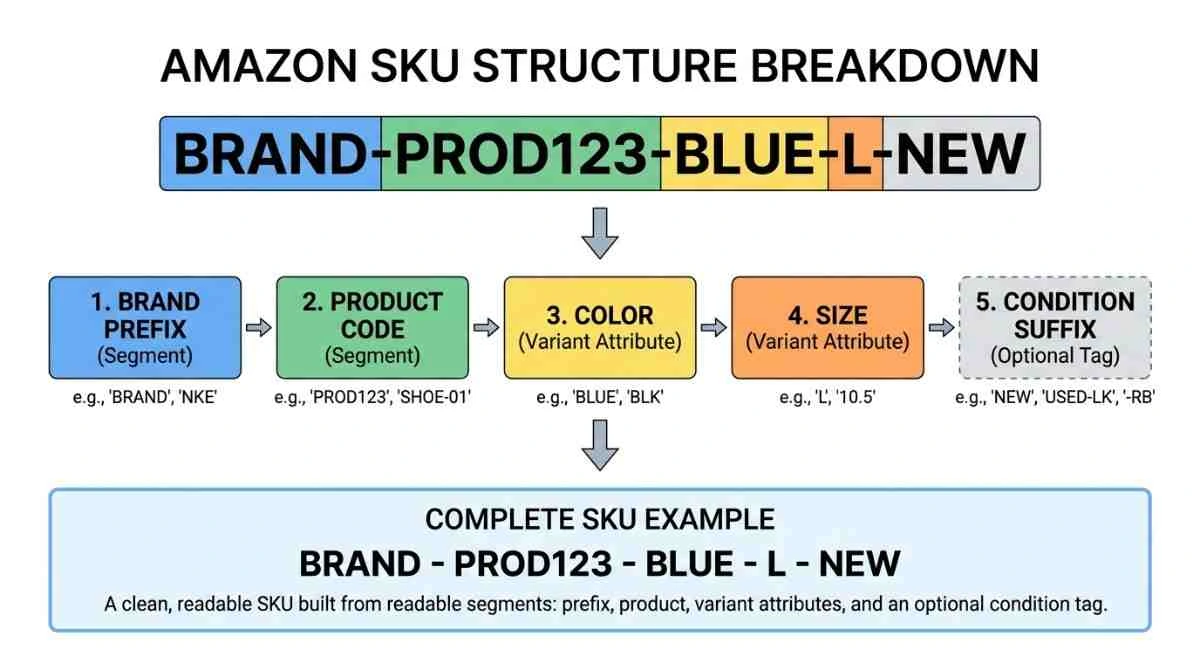
An Amazon SKU (Stock Keeping Unit) is the private code you assign to each product to track it inside Seller Central. You create it. You control it. Buyers never see it. Amazon calls it a Merchant SKU, or MSKU, and it sits at the center of your inventory, orders, and reporting.
Here’s the part sellers miss: the SKU is the only identifier on your listing that is entirely yours. Amazon hands you the ASIN. GS1 sells you the UPC. Amazon’s warehouses generate the FNSKU. But the SKU? That’s your system, your logic, your naming rules. Get it right and you can read your entire catalog at a glance. Get it wrong and every stock report becomes a puzzle.
Think of it like the label on a moving box. “Box 1” tells you nothing. “KITCHEN-PLATES-WHITE-12PK” tells you everything before you open it. A good Amazon SKU number works the same way, so your team knows what a code means without checking a spreadsheet.
2 SKU vs FNSKU vs ASIN vs UPC: What’s the Difference?
New sellers mix these four up constantly, and the confusion causes real shipping and listing errors. Each identifier has one job and one owner. Here’s the clean breakdown:
| Identifier | Who Assigns It | What It Does | Example |
|---|---|---|---|
| SKU / MSKU | You (the seller) | Internal inventory tracking and multi-channel sync | AMZ-HOODIE-BLK-L |
| FNSKU | Amazon FBA | Identifies your specific units in Amazon’s warehouse | X001ABC234 |
| ASIN | Amazon | Identifies the public product page (shared by all sellers) | B08N5WRWNW |
| UPC / EAN | GS1 | Global retail barcode, often required to create a listing | 012345678905 |
Quick way to remember it: UPC is the product’s global ID card, ASIN is Amazon’s address for the listing, FNSKU is the warehouse tag on your unit, and the SKU is your own private nickname. Buy legitimate barcodes only from GS1, the official global barcode authority.
3 Amazon SKU Rules & Character Limits You Can’t Ignore
Before you build your Amazon SKU format, learn the hard limits. Break these and Amazon either rejects your upload or, worse, silently mangles your data.
- 40-character maximum. Amazon caps SKUs at 40 characters. Aim for 8–20 so codes stay readable and printable on labels.
- Safe characters only. Stick to letters, numbers, hyphens (-), and underscores (_). Skip spaces, slashes, and symbols like &, #, @, %.
- Watch leading zeros. Spreadsheets strip a zero from “0123” and turn it into “123.” Start with a letter to avoid it.
- SKUs are permanent. Once a SKU is tied to a listing, you can’t edit it. Changing it means creating a new listing and losing that SKU’s sales history.
- Never reuse a retired SKU. Amazon keeps historical data attached to old codes, which corrupts your reporting.
For the current field-level requirements, Amazon documents them inside Seller Central Help. Rules shift by category, so confirm before a large bulk upload.
4 How to Create an Amazon SKU: Step-by-Step
Learning how to create an Amazon SKU takes about five minutes once you have a system. Follow this order and your codes will scale cleanly from 10 products to 10,000.
Step 1: Pick your segment order
Decide the sequence of information in every SKU and freeze it. A proven order: Prefix → Product → Color → Size → Condition. Consistency is the whole point, so every code follows the same skeleton.
Step 2: Build a short prefix
Use a 2–4 letter code for the brand or category, like AMZ, HOME, or APP. This groups related products together when you sort your catalog.
Step 3: Add a product code and attributes
Give the product a short readable name (HOODIE, not PRD0093), then append variant attributes such as color and size. Keep abbreviations consistent: always BLK, never sometimes BLACK.
Step 4: Choose one separator and lock case
Pick a hyphen or underscore and use it everywhere. Set everything to UPPERCASE so codes stay easy to read on printed labels and scanners. The result: AMZ-HOODIE-BLK-L-FBA.
Skip the manual typing: Our free Amazon SKU Generator builds every color-and-size combination automatically and renders a printable barcode for each one.
5 Amazon SKU Format Examples & Naming Conventions
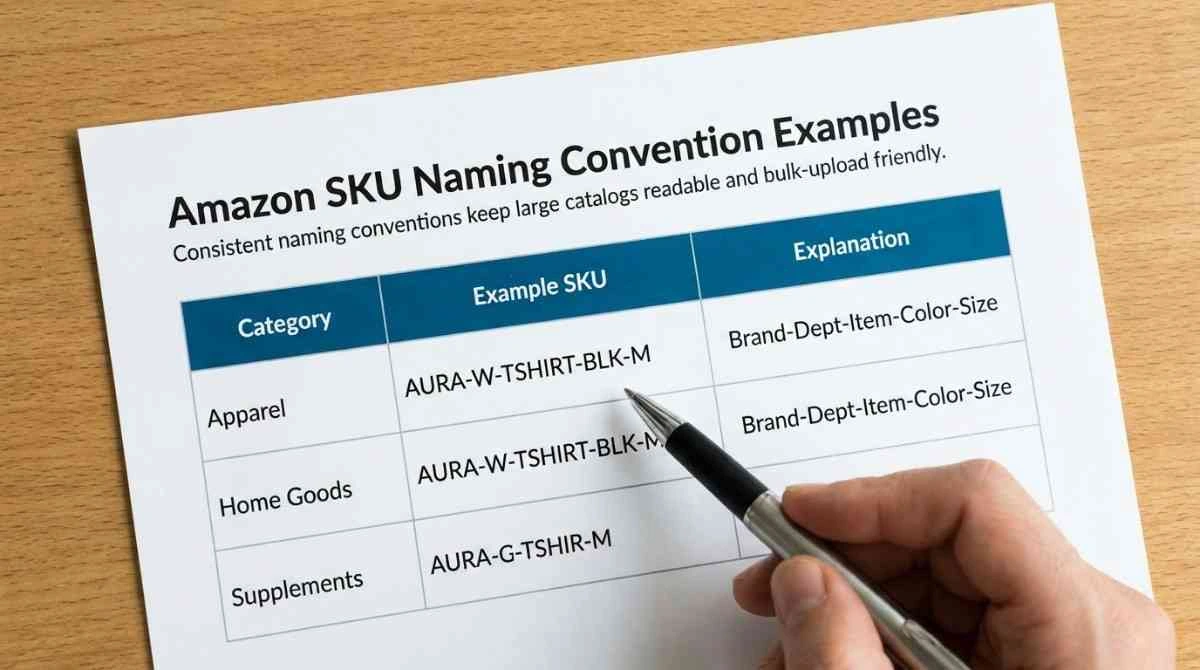
Different catalogs call for different approaches. Here are three battle-tested Amazon SKU format systems and when to use each:
| System | Example | Best For |
|---|---|---|
| Descriptive | MUG-CERAMIC-WHT-12OZ | Small catalogs where readability matters most |
| Supplier-based | SUP01-1234-RED-M | Sellers sourcing from multiple suppliers |
| Hybrid + sequence | HOME-KTCHN-00542 | Large, fast-growing catalogs needing unique IDs |
Whichever you choose, document it. A one-page “SKU key” saved in your shared drive keeps every team member and virtual assistant building codes the same way. If you’re also finalizing your brand identity, our Amazon Store Name Generator pairs well with a fresh catalog build.
6 Parent-Child SKUs for Product Variations
Selling a shirt in four colors and five sizes? That’s 20 child variations under one parent listing, and each needs its own Amazon SKU. Structure them so the parent is obvious and every child is unique.
Use a shared root for the parent, then extend it for each child:
- Parent: AMZ-TEE
- Child: AMZ-TEE-BLK-S
- Child: AMZ-TEE-BLK-M
- Child: AMZ-TEE-RED-S
This is exactly the kind of matrix that’s painful to type by hand. A generator that produces every combination at once removes the risk of duplicate or skipped codes, especially when a listing has dozens of children.
7 Common SKU Mistakes That Cost Sellers Money
These errors look small until you’re managing hundreds of products. Each one creates hours of cleanup later:
- Putting prices or dates in the SKU. Both change. Your code shouldn’t. A SKU like SHIRT-19.99 is useless the moment you run a sale.
- Random auto-generated numbers only. A code like 8837201 means nothing to a human and forces you to check a lookup sheet every time.
- Inconsistent abbreviations. Mixing BLK, BLACK, and BK breaks your ability to filter by color.
- Spaces and symbols. These break CSV uploads and label printers, sometimes without any visible error.
Clean SKUs are one piece of a healthy account. If you want a full review of your catalog, listings, and Buy Box position, our Amazon account management team handles it end to end.
8 Generate SKUs Instantly with the Free BuyBoxr SKU Generator
Once you know the rules, you shouldn’t be typing codes one by one. Our free Amazon SKU generator takes your prefix, product name, and variant lists, then builds the complete matrix in a single click. Every combination comes out consistent, correctly separated, and cased.
It also renders a Code-128 barcode for each SKU and exports the whole set to CSV, ready for a Seller Central bulk upload or your label printer. No sign-up, no limits.
Before you launch, it’s also smart to confirm your brand name is clear. Run it through our Amazon Brand Name Checker, and check your listing’s competitiveness with the Amazon Buy Box Checker.
Frequently Asked Questions
An Amazon SKU (Stock Keeping Unit), also called an MSKU, is a seller-created code used to track a product inside Seller Central. You design its format, it’s private to your account, and buyers never see it.
Amazon allows up to 40 characters. For readability and label printing, keep your SKUs between 8 and 20 characters using only letters, numbers, hyphens, and underscores.
No. Once a SKU is assigned to a listing it’s permanent. To use a different code you must create a new listing, which starts its sales history from zero. That’s why a solid naming system matters from day one.
No. A SKU is your private tracking code. A UPC is a global barcode issued by GS1. An ASIN is Amazon’s public product-page ID. All three are separate identifiers with different owners and purposes.