Amazon A+ Content Guide: Benefits, Examples & Specs (2026)
Are you looking to boost your Amazon conversion rates and scale sales without increasing PPC advertising spend? Implementing high-converting Amazon A+ Content (formerly Enhanced Brand Content or EBC) is the single most effective strategy to turn listing visitors into loyal buyers. In this comprehensive guide, we cover key benefits, design guidelines, image size specs, standard vs premium A+ content examples, and step-by-step optimization strategies to dominate your category in 2026.
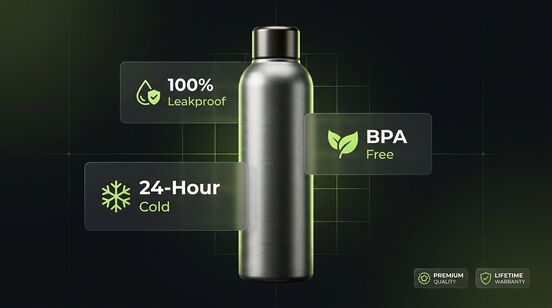
1What is Amazon A+ Content? (Overview & EBC Evolution)
Definition: Amazon A+ Content is a premium visual feature available to sellers enrolled in Amazon Brand Registry and 1P vendors. It replaces standard plain-text product descriptions with rich multimedia layouts, custom graphics, brand story carousels, and shoppable product comparison tables.
Historically known as Amazon Enhanced Brand Content (EBC) for 3P sellers and A+ Detail Pages for 1P vendors, Amazon consolidated these tools under the A+ Content Manager in Seller Central. Rather than forcing shoppers to read dense blocks of unformatted text, a+ content creation transforms product detail pages into landing-page experiences that convey value propositions within seconds.
When buyers scroll down past the fold on your listing, standard text descriptions are frequently skipped. High-quality amazon brand enhanced content bridges the gap between passive browsing and purchasing by visually demonstrating product benefits, clarifying dimensions, and eliminating buyer hesitation.
2Key Benefits of Amazon A+ Content in 2026
Industry research, including benchmark studies on stella rising amazon a+ content benefits 2026 and stella rising amazon a+ content benefits 2025, confirms that adding A+ Content directly impacts your entire e-commerce sales funnel:
3% to 20% Conversion Lift
Official Amazon internal data shows that Basic A+ Content increases sales by up to 8%, while Premium A+ Content drives conversion lifts up to 20% by answering customer questions visually.
Drastic Reduction in Return Rates
Clear infographics, technical specs tables, and dimension callouts set realistic customer expectations, minimizing negative reviews and product returns caused by size or usage confusion.
Mobile-First Optimization
With over 60% of Amazon buyers shopping on mobile devices, custom A+ modules adapt automatically to smartphone screens, ensuring high scannability and fast loading times.
Catalog Cross-Selling & Higher AOV
Interactive comparison charts allow you to cross-sell complementary products in your catalog, increasing Average Order Value (AOV) and keeping buyers within your brand ecosystem.
Additionally, while Amazon’s A10 algorithm doesn’t directly rank images, Google indexers crawl text inside A+ modules and image alt-text. Following Google Search Central Guidelines, incorporating strategic keywords into your A+ text and image alt tags helps your listings rank organically on Google search results for long-tail buyer queries.
For brands launching new Private Label ASINs, combining A+ Content with a structured Amazon FBA Private Label Strategy and optimized Amazon PPC Campaigns creates a flywheel effect that accelerates sales velocity.
3Basic A+ Content vs. Premium A+ Content (A++) vs. Brand Story
Amazon offers three distinct enhanced content modules for brand owners. Understanding the differences is critical when planning your amazon enhanced brand content design:
| Feature / Attribute | Basic A+ Content | Premium A+ Content (A++) | Amazon Brand Story |
|---|---|---|---|
| Maximum Modules | Up to 5 modules per ASIN | Up to 7 modules per ASIN | Dedicated carousel section (“From the brand”) |
| Video Integration | Not available | Full HD 720p videos & background loop video clips | Not available |
| Interactive Hotspots | Not available | Hover hotspot circles with popup benefit text | Not available |
| Comparison Charts | Standard comparison table | Shoppable comparison table (Add to Cart buttons) | Product link cards |
| Eligibility Criteria | Active Amazon Brand Registry | Brand Story published + 15 approved A+ submissions | Active Amazon Brand Registry |
| Primary Purpose | Product feature education | Immersive luxury storytelling & visual proof | Brand awareness & multi-SKU cross-selling |
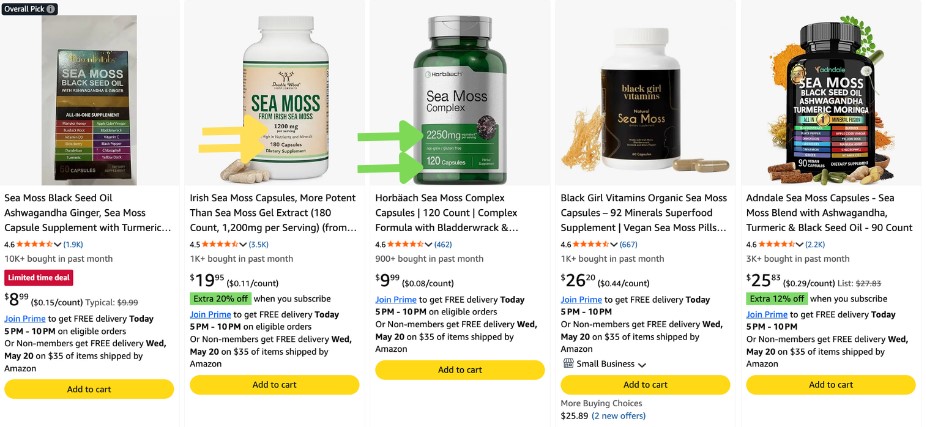
The Amazon Brand Story module appears above standard A+ Content in a dedicated horizontal scroll section titled “From the brand”. It lets you showcase your company’s mission, values, founder story, and links to your Amazon Storefront. Using your Amazon Store Name effectively in your Brand Story builds customer affinity and brand authority.
4Amazon A+ Content Guidelines & Image Size Specs (2026 Specs)
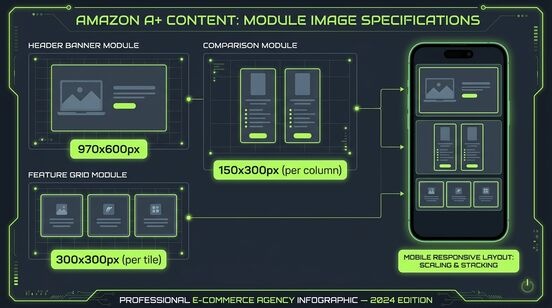
To avoid immediate rejection during Amazon’s automated review process, your graphic designers must strictly follow official module dimensions and guidelines:
| Module Layout Name | Recommended Dimensions (Pixels) | Best Use Case & Functional Role |
|---|---|---|
| Full Width Header Banner | 970 x 600 px | Main visual hook, brand storytelling, hero lifestyle graphic |
| Standard Comparison Table | 150 x 300 px (per image thumbnail) | Side-by-side feature matrix to cross-sell catalog ASINs |
| Single Image & Feature Highlights | 300 x 300 px | Close-up zoom shot of product USPs with side copy |
| Four Image & Text Grid | 220 x 220 px | Multi-feature highlights, step-by-step usage guide |
| Company Logo Banner | 600 x 180 px | Header branding placement at the top of detail pages |
Always enter descriptive image alt-text (up to 100 characters) for every uploaded graphic. Alt-text is used by screen readers for accessibility and is indexed by Google and Amazon’s AI shopping assistant (Rufus) to match semantic product searches!
5Real-World Amazon Enhanced Brand Content Examples
Analyzing successful amazon enhanced brand content examples and amazon premium a+ content examples reveals clear pattern trends across top-performing brands:
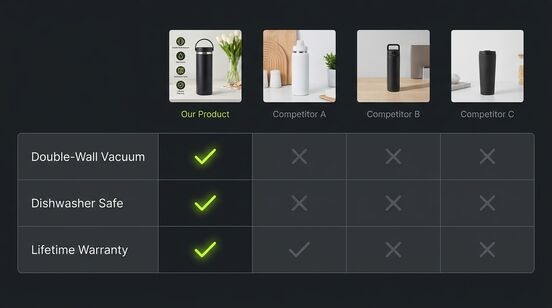
Example 1: Comparison Matrix Modules
Comparison tables are the highest-converting module in A+ Content. By showcasing your product lineup side-by-side with clear checkmarks for key features (such as battery life, waterproof rating, or material quality), buyers quickly identify the exact SKU that fits their budget without leaving your detail page.
Example 2: Visual Step-by-Step Installation Guides
For complex products like home fixtures, kitchen appliances, or assembly tools, replacing written manuals with a 4-grid visual installation guide reassures shoppers that setup takes minutes. Adding “Easy 15-Minute Assembly” badges builds instant confidence.
Example 3: Premium A++ Interactive Hotspots & Carousels
Top electronics and apparel brands use premium a+ content examples featuring hover hotspots over key product components. Shoppers can hover over a backpack’s padded strap or water bottle spout to reveal inline micro-copy detailing waterproof coatings and ergonomic design.
6Amazon Premium A+ Pages Design Best Practices & Tips
To maximize conversion efficiency, top sellers adhere to these amazon premium a+ pages design best practices tips:
- Maintain Brand Visual Consistency: Use uniform color palettes, font styles, and lighting across all listing modules.
- Write for Skimmers (8th-Grade Reading Level): Keep paragraphs under 3 lines. Use bold text for key benefits and scannable bullet points.
- Focus on Customer Outcomes, Not Technical Specs: Translate specifications into real-world benefits (e.g., instead of “18/8 Stainless Steel”, write “Rust-Proof & Keeps Drinks Cold for 24 Hours”).
- Avoid Embedded Text in Small Images: Text baked inside small images becomes unreadable on mobile screens. Use clean background imagery and pair it with live text fields.
- Organize Catalog SKUs with Standard Taxonomy: Keep your Merchant SKUs structured using our free Amazon SKU Generator Tool to maintain clean inventory across FBA shipping plans.
Amazon strictly rejects A+ submissions containing promotional claims like “Best Selling”, “#1 Rated”, warranty guarantees, pricing details, shipping claims, external website URLs, QR codes, or references to competitor brands!
7Step-by-Step: How to Publish A+ Content in Seller Central
Publishing your custom A+ Content is straightforward inside Amazon Seller Central:
Step 1: Open A+ Content Manager
Log into Seller Central → Hover over Advertising → Click A+ Content Manager.
Step 2: Choose Project Type & Add Modules
Select “Start Creating A+ Content” (Basic, Premium, or Brand Story). Choose up to 5-7 module blocks that match your asset plan.
Step 3: Upload Imagery, Copy & Alt-Text
Upload high-resolution graphics matching module specs. Fill in all copy blocks and image alt-text fields.
Step 4: Apply ASINs & Submit for Review
Apply the content to individual ASINs or parent families. Preview desktop and mobile layouts, then click Submit for Review (approval takes 24 to 72 hours).
8Professional A+ Content Writing Services & Agency Solutions
While DIY tools can help, scaling a multi-SKU brand often requires professional amazon a+ content writing services, specialized a+ content services, or an experienced amazon enhanced brand content service team.
Partnering with an elite amazon a+ content agency like BuyBoxr ensures your listings feature professional copywriting, custom graphic design, conversion-focused strategy, and full compliance management. Combining A+ Content with our Best Amazon PPC Tools Selection maximizes campaign ROI across your store catalog.
9Frequently Asked Questions (FAQ)
Yes! Standard Amazon A+ Content and Brand Story modules are 100% free for all 3P sellers and 1P vendors enrolled in Amazon Brand Registry. Premium A+ Content (A++) is also free for sellers meeting eligibility requirements.
While Amazon’s internal search algorithm doesn’t directly index text inside images, A+ Content significantly increases conversion rates, which drives higher organic ranking signals. Additionally, Google indexes A+ module text and image alt-text for external SEO ranking.
Amazon support typically reviews and approves A+ Content submissions within 24 to 72 hours. If rejected, Seller Central provides specific reason codes so you can quickly adjust copy or images and resubmit.
To qualify for free Premium A+ Content, sellers must have a published Brand Story module across their catalog and at least 15 approved A+ Content submissions in the past 12 months.
Yes, you can edit published A+ Content anytime inside A+ Content Manager in Seller Central. Changes take effect on live Amazon listings immediately after passing re-review.
Ready to Scale Your Amazon Store Conversions?
Our team of Amazon listing optimization experts at BuyBoxr designs high-converting A+ Content, optimized storefronts, and full listing copy to grow your brand’s revenue.
Get Started with BuyBoxr Agency